PHP and Docker: The Perfect Dev Stack
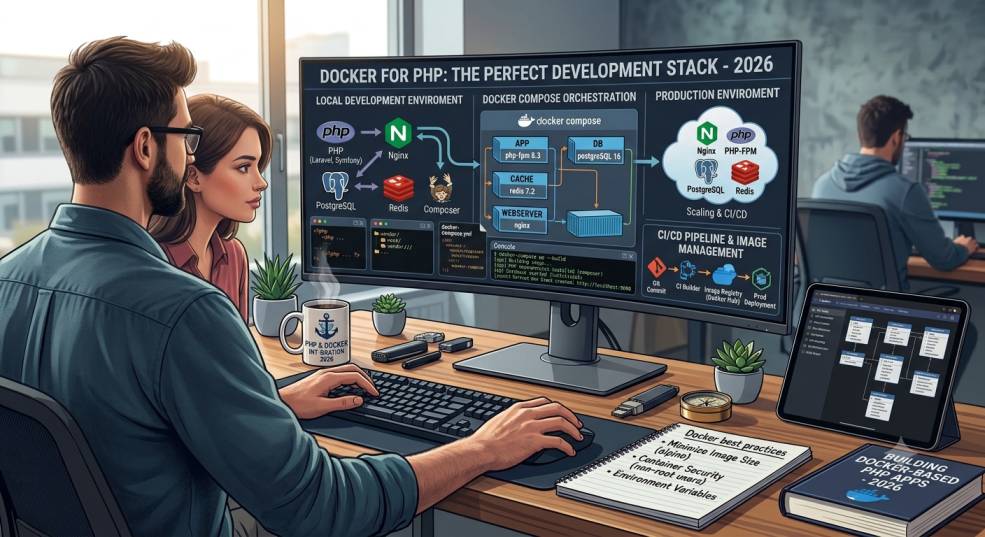
In modern web development, efficiency, consistency, and scalability are key. Developers want environments that work seamlessly across systems, minimize setup issues, and make deployment easier. Enter Docker, the containerization tool that has revolutionized software development.
When combined with PHP, Docker creates a powerful development stack that ensures your application runs the same way on every machine — from local environments to production servers. In this blog, we’ll explore why Docker is the perfect companion for PHP, how it works, and how you can use it to streamline your workflow in 2025.
What is Docker?
Docker is an open-source platform that allows developers to package applications and their dependencies into containers. A container is a lightweight, isolated environment that behaves consistently across different systems.
Unlike virtual machines, Docker doesn’t require a full operating system for each environment — it uses the host OS kernel, making it faster and more efficient.
For PHP developers, Docker eliminates the familiar “it works on my machine” problem by providing a uniform runtime environment across development, testing, and production.
Why Use Docker for PHP Development?
There are many reasons why Docker has become the standard for PHP development in modern environments. Let’s look at the most important ones.
1. Environment Consistency
With Docker, you can define your PHP version, web server, database, and extensions in a single configuration file (Dockerfile or docker-compose.yml). Everyone on your team will run the same setup — no version mismatches, no dependency conflicts.
2. Fast and Isolated Setup
Each PHP project can have its own isolated environment. You can run PHP 7.4 for one project and PHP 8.3 for another without any system conflicts.
3. Simplified Deployment
The same container you use in development can be deployed to staging or production. This guarantees consistency between environments and reduces deployment-related bugs.
4. Easy Dependency Management
Installing PHP extensions or services like Redis, MySQL, or Elasticsearch is as simple as adding a few lines to your Docker configuration. Docker handles all dependencies automatically.
5. Version Control for Infrastructure
Your entire server environment — PHP version, Nginx configuration, database, caching system — can be stored in your project’s version control (like Git). This makes your infrastructure portable and reproducible.
Key Components of a PHP + Docker Stack
A typical PHP-Docker stack includes several containers working together:
-
PHP-FPM – Runs PHP scripts and processes requests.
-
Nginx or Apache – Handles incoming HTTP requests and serves static files.
-
Database (MySQL/PostgreSQL) – Stores application data.
-
Cache Layer (Redis/Memcached) – Improves performance.
-
Composer – Manages PHP dependencies.
-
phpMyAdmin or Adminer (optional) – Provides database GUI access.
Setting Up a PHP Project with Docker
Let’s look at how you can quickly set up a PHP development environment using Docker.
Step 1: Install Docker
Before starting, make sure Docker and Docker Compose are installed on your system.
You can download them from the official Docker website and verify the installation with:
Step 2: Create a Dockerfile
A Dockerfile defines how your PHP container is built. Here’s a simple example:
This sets up a PHP 8.3 environment with PDO MySQL support and exposes port 9000 for FastCGI.
Step 3: Add a Docker Compose File
A docker-compose.yml file helps you manage multiple containers at once.
This configuration creates three containers:
-
A PHP application container (
app) -
An Nginx web server container (
web) -
A MySQL database container (
db)
Step 4: Configure Nginx
Create an nginx.conf file in your project root:
Step 5: Run the Stack
Run the following command to start your PHP development environment:
Your PHP app will now be available at http://localhost:8080.
Using Composer and Other Tools
Docker allows you to run Composer inside the container, keeping your system clean:
You can also run PHPUnit, artisan commands, or other CLI tools directly within the container environment.
Advanced Docker Tips for PHP Developers
1. Use Docker Volumes for Code Persistence
Mounting your project directory as a volume allows you to edit files on your host machine and see changes immediately inside the container.
2. Leverage Multi-Stage Builds
Multi-stage builds help reduce image size and speed up deployments by separating build and runtime environments.
3. Enable OPcache
Enable OPcache in your PHP container for better performance in production environments.
Add this line to your Dockerfile:
4. Use Environment Variables
Store credentials and configuration in a .env file and reference them in docker-compose.yml to keep your secrets secure.
5. Connect Docker with PHPStorm or VS Code
Modern IDEs like PHPStorm and VS Code can integrate directly with Docker, allowing you to debug PHP code, run tests, and manage containers visually.
Benefits of Dockerizing PHP Applications
-
Rapid Onboarding – New developers can start working instantly by running a single command.
-
Easy Scaling – Containers can be replicated across servers for load balancing and high availability.
-
Consistent Deployments – The same image runs everywhere — no environment drift.
-
Microservices Ready – PHP services can easily communicate with other containers (like Node.js or Python APIs).
-
Simplified CI/CD Pipelines – Docker integrates smoothly with CI/CD tools like GitHub Actions, Jenkins, and GitLab CI.
Common Challenges and How to Overcome Them
-
Slow Performance on macOS/Windows: Use Docker volumes efficiently or switch to Docker’s WSL 2 backend for faster file access.
-
Container Size: Use lightweight base images like
php:8.3-fpm-alpine. -
Debugging Issues: Use Xdebug with proper port mapping to debug code inside containers.
Conclusion
In 2025, PHP and Docker have become an unbeatable combination for web developers seeking consistency, scalability, and speed. By containerizing your PHP applications, you can ensure a stable environment that runs identically across development, testing, and production.
Whether you’re working on a small Laravel project or deploying enterprise-scale applications, Docker helps streamline workflows, automate setups, and eliminate deployment headaches.
With Docker, PHP development becomes cleaner, faster, and far more efficient — truly making PHP and Docker the perfect dev stack for modern software engineering.


