Modern PHP Coding Standards: PSR-12 Explained
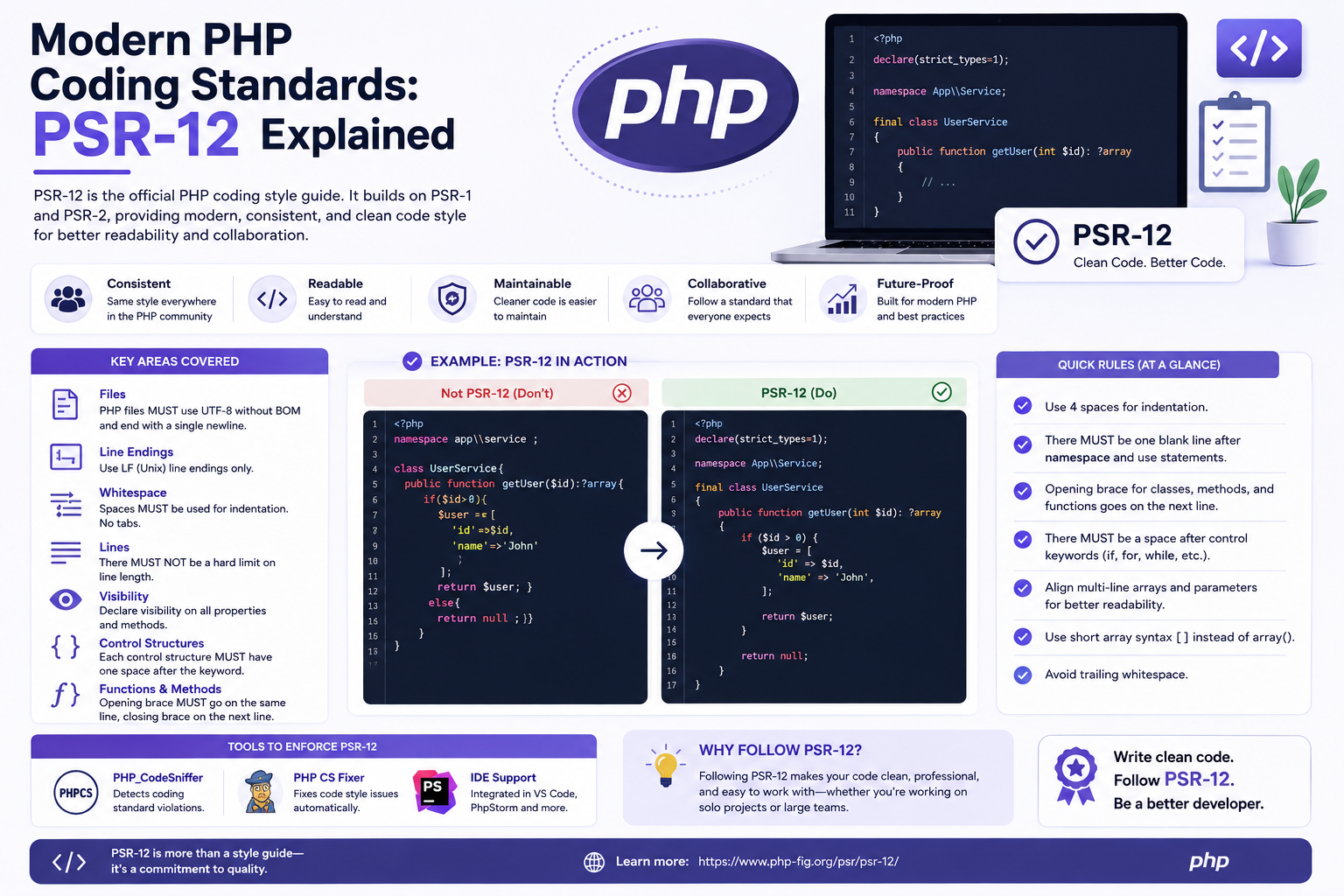
The PHP ecosystem has come a long way in recent years. As projects expand and more developers contribute, maintaining clean and consistent code becomes essential. This is where PSR-12, one of the most influential PHP coding standards, steps in.
PSR-12 ensures that every developer writes code following the same structure and formatting rules, leading to readable, maintainable, and professional PHP applications.
What Is PSR-12?
PSR-12 (PHP Standard Recommendation 12) is a coding guideline published by the PHP-FIG (Framework Interop Group). It extends earlier standards like PSR-1 and PSR-2 to support modern PHP syntax, including namespaces, traits, and type declarations.
In simple terms, PSR-12 provides a uniform set of formatting rules that help developers write clean and consistent PHP code across any framework or project.
Why Coding Standards Are Important
Coding standards aren’t just about aesthetics — they directly influence how efficiently teams work together.
Here’s why every developer should care about PSR-12:
-
Improved readability: Code looks organized and easier to understand.
-
Team collaboration: Developers can quickly read and review each other’s work.
-
Fewer bugs: Consistent patterns reduce errors.
-
Easier maintenance: Clean code is simpler to modify or refactor later.
-
Professionalism: It reflects industry-level coding discipline.
From PSR-1 and PSR-2 to PSR-12
Earlier, PSR-1 and PSR-2 defined foundational guidelines for PHP development.
-
PSR-1 focused on basic structure — like file encoding, naming conventions, and class autoloading.
-
PSR-2 refined that structure by adding rules for indentation, braces, and line length.
However, as PHP evolved (with versions 7 and 8 introducing strict typing and modern syntax), PSR-2 became outdated. Thus, PSR-12 was introduced to modernize these rules for today’s PHP practices.
Key Principles of PSR-12
1. File Structure and Encoding
Every PHP file should:
-
Use UTF-8 encoding without a byte order mark (BOM).
-
Contain only one class, interface, or trait.
-
Avoid closing PHP tags (
?>) at the end of pure PHP files.
2. Namespace and Use Declarations
All namespaces and imported classes (use statements) appear at the top of the file, each on a separate line.
This makes dependencies easy to locate and manage.
3. Class and Method Formatting
Classes and methods follow a simple, predictable structure:
-
Opening braces go on a new line.
-
Every property and method must declare visibility (
public,protected, orprivate). -
One property should be defined per line.
4. Control Structures
Control statements like if, for, foreach, and while must include braces, even for single-line logic.
There should be a space after the keyword and before the opening parenthesis:
5. Indentation and Line Length
PSR-12 enforces four spaces for indentation — no tabs.
Lines should not exceed 120 characters, ensuring better readability across editors and screens.
6. Spacing and Operators
Spaces improve visual clarity around operators and commas.
Avoid unnecessary spacing or mixing of styles within the same file.
7. Anonymous Functions and Classes
Modern PHP allows anonymous functions and classes. PSR-12 ensures they follow the same rules as normal declarations:
8. Constants and Naming Conventions
Constants are written in uppercase with underscores, like MAX_LIMIT.
Methods and variables follow camelCase, while class names use PascalCase.
9. Error Handling
Try-catch blocks should maintain consistent spacing and indentation.
For example:
10. Strict Typing and Declarations
When using strict typing, always place the declare(strict_types=1); statement at the top of the file, immediately after the opening tag. This ensures type safety across the entire file.
Automating PSR-12 with Tools
Manually enforcing every rule can be tedious. Thankfully, several tools can automatically format and validate your code according to PSR-12.
PHP_CodeSniffer
This is the most popular tool for PSR compliance.
Install it via Composer:
Run a check:
Automatically fix issues:
PHP-CS-Fixer
Another popular option that can both detect and automatically correct formatting issues.
Both tools can integrate with IDEs like VS Code, PhpStorm, and Sublime Text, helping you maintain standards effortlessly.
PSR-12 in Modern Frameworks
Frameworks such as Laravel, Symfony, and CakePHP already follow PSR-12 conventions internally. By adopting the same standards, your custom code will integrate seamlessly with these frameworks and third-party libraries.
Following PSR-12 ensures that your code:
-
Matches professional open-source projects.
-
Aligns with modern PHP syntax.
-
Remains compatible with continuous integration tools and pipelines.
Common Mistakes Developers Make
Even experienced developers occasionally break PSR-12 rules. Some frequent mistakes include:
-
Mixing tabs and spaces for indentation.
-
Forgetting blank lines after namespaces.
-
Writing overly long lines.
-
Omitting visibility keywords.
-
Ignoring spacing around operators or control statements.
Avoiding these mistakes keeps your code clean and uniform.
Benefits of Using PSR-12
The advantages of PSR-12 go beyond aesthetics. It helps shape a better workflow:
-
Consistency across teams — every developer writes in the same format.
-
Reduced merge conflicts — consistent indentation minimizes diff changes.
-
Readable documentation — your code becomes self-explanatory.
-
Improved performance in teamwork — faster onboarding and easier reviews.
-
Professional appeal — shows adherence to global best practices.
How to Start Using PSR-12
-
Install PHP_CodeSniffer or PHP-CS-Fixer.
-
Set your IDE to use PSR-12 formatting (many IDEs have presets).
-
Reformat existing code to match the standard.
-
Include code checks in your CI/CD pipeline to ensure ongoing compliance.
Once your project adopts PSR-12, new contributors will instantly recognize the structure, saving time and confusion.
Final Thoughts
PSR-12 represents the evolution of modern PHP coding style — consistent, readable, and aligned with current PHP capabilities. Adopting it doesn’t just make your code look cleaner; it makes your entire development process smoother and more professional.
Whether you’re building a small project or managing a large enterprise application, following PSR-12 ensures your PHP codebase remains clean, structured, and future-ready.
So, start today: install a code linter, apply PSR-12 rules, and experience how clean and organized your PHP code can truly be.


