Managing Large PHP Codebases Effectively
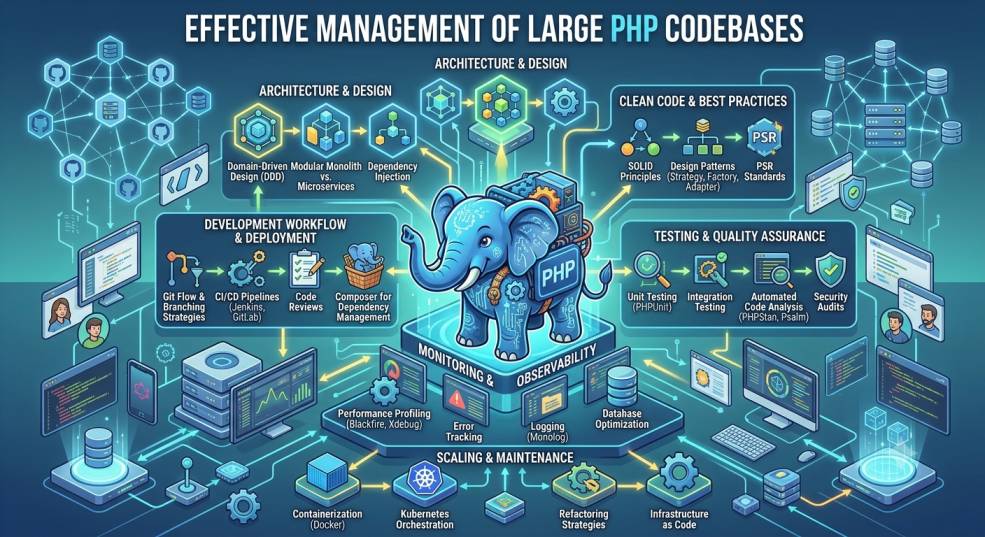
As PHP applications grow in size and complexity, maintaining the codebase becomes increasingly challenging. What starts as a simple project can quickly expand into a large system with multiple modules, APIs, external services, business rules, and contributors. Without proper organization and coding discipline, the code becomes difficult to maintain, difficult to scale, and prone to bugs.
Managing a large PHP codebase is not just about writing code—it is about establishing standards, choosing the right architecture, managing dependencies, and creating maintainable workflows. In this article, we’ll explore the essential strategies for keeping your PHP projects clean, efficient, and scalable.
1. Start with a Well-Defined Architecture
Large applications benefit from structured design patterns. PHP offers multiple ways to organize business logic, but the most suitable approach depends on project complexity and team size.
Use MVC or Hexagonal Architecture
-
MVC (Model-View-Controller) works well for common web applications.
-
Hexagonal / Clean Architecture is preferred when business logic must be isolated from delivery layers (like framework or UI changes).
Modular or Domain-Driven Design
Break the system into domains or modules such as:
-
User Management
-
Payment Processing
-
Inventory Management
Each module should function independently. This prevents spaghetti code and reduces dependency coupling.
2. Use Composer for Dependency Management
Composer is the backbone of modern PHP development. Handling libraries manually leads to version conflicts and inconsistent builds.
Key Practices:
-
Always define version constraints (
^,~, or exact versions) -
Use
composer.lockto ensure reproducible environments -
Remove unused dependencies regularly
-
Use
composer outdatedto track library updates
This ensures your application remains secure and maintainable over time.
3. Adopt a Consistent Coding Standard
Consistency reduces mental load for developers reading or modifying code.
Recommended Standards:
-
PSR-1 & PSR-12 for coding style and file structure
-
PSR-4 for autoloading namespaces
You can enforce these standards automatically using:
-
PHPCS (PHP CodeSniffer)
-
PHP-CS-Fixer
Run these tools in CI to ensure code consistency across the entire team.
4. Implement Automated Testing
Without tests, changes in one part of the system can unintentionally break another.
Types of Testing to Include:
| Test Type | Purpose | Tools |
|---|---|---|
| Unit Tests | Validate individual functions and classes | PHPUnit, Pest |
| Integration Tests | Test interaction between modules | PHPUnit |
| End-to-End Tests | Test user-facing workflows | Codeception, Cypress (frontend) |
Integrate test execution in CI pipelines so the code is always tested on every commit.
5. Use Version Control and Branching Strategies
Git is essential for collaborative development.
Recommended Workflows:
-
Git Flow for larger teams
-
Trunk-Based Development for faster iteration
Branch Naming Conventions:
-
feature/*for new features -
bugfix/*for fixing bugs -
hotfix/*for urgent production issues -
release/*for staged releases
Proper branching ensures cleaner collaboration and reduces code conflicts.
6. Apply Continuous Integration and Deployment (CI/CD)
CI/CD automates testing, building, and deployment.
Tools to Use:
-
GitHub Actions
-
GitLab CI
-
Jenkins
-
CircleCI
Benefits:
-
Faster release cycles
-
Fewer merge conflicts
-
Consistent build environments
-
Reduced risk of deployment failures
In large PHP systems, CI/CD is no longer optional—it’s essential.
7. Document Everything Clearly
Documentation helps developers understand system logic without digging through code.
What to Document:
-
System architecture overview
-
Setup instructions
-
API endpoints
-
Data flow diagrams
-
Coding standards & naming conventions
Use tools like:
-
README.md files
-
PHPDoc for functions and classes
-
Swagger/OpenAPI for API documentation
Well-documented codebases reduce onboarding time for new developers.
8. Monitor Performance and Errors in Production
Large PHP applications must be monitored continuously to detect issues early.
Recommended Tools:
-
Monolog + logging services like Graylog or ELK Stack
-
Performance monitoring with New Relic or Blackfire
-
Error tracking with Sentry or Bugsnag
Monitoring provides insights into code bottlenecks, failed processes, and slow queries.
9. Plan Regular Refactoring Sessions
Refactoring improves code quality without altering functionality.
Refactor When:
-
Classes exceed reasonable size
-
Functions handle too many responsibilities
-
Duplicate logic appears repeatedly
Refactoring Tools:
-
IDE refactoring tools (PhpStorm, VS Code extensions)
-
Static analysis tools like:
-
PHPStan
-
Psalm
-
Small, continuous refactoring prevents technical debt from accumulating.
Conclusion
Managing large PHP codebases effectively is about applying discipline, structure, and automation to the development process. By adopting modular architecture, consistent coding standards, automated testing, proper documentation, CI/CD workflows, and ongoing refactoring, teams can ensure their PHP applications remain stable, scalable, and easy to maintain—even as they grow over time.
A clean and well-structured codebase is not just easier to work with—it saves time, reduces bugs, improves developer happiness, and extends the lifespan of your product.


