Laravel Custom Validation Rules
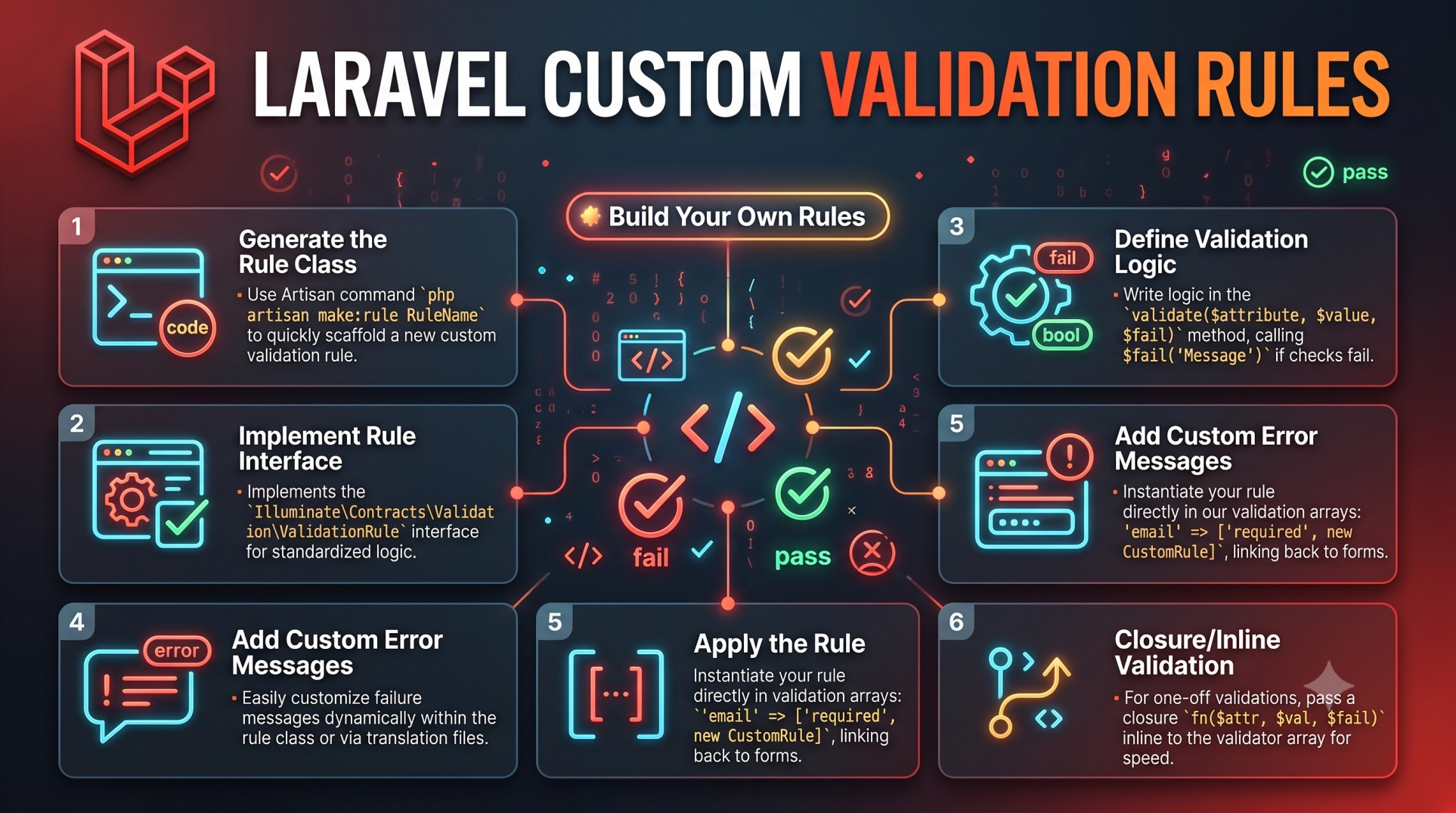
Validation is one of the most crucial aspects of web application development. It ensures that the data entering your system is clean, secure, and formatted correctly before being processed or stored. In Laravel, validation is not just a side feature — it’s a core part of the framework’s philosophy of writing clean, reliable, and secure code.
While Laravel provides an extensive set of built-in validation rules such as required, email, unique, and numeric, real-world applications often demand something more flexible. You might need to validate a custom business logic condition, check external API data, or enforce unique constraints that don’t fit into Laravel’s default rules.
This is where custom validation rules come into play. They give developers the power to extend Laravel’s validation system and define their own reusable, domain-specific rules. Let’s explore why they matter, how they work, and what best practices ensure your validation logic remains robust and maintainable.
Why Validation Matters in Laravel
Validation protects your application from bad or malicious data. Without proper validation, users could submit incomplete forms, upload unsupported file types, or even attempt to inject harmful content into your system.
Laravel’s validation system provides a seamless way to prevent such issues. It automatically handles data checking, error message generation, and user feedback, allowing developers to focus on core functionality rather than repetitive validation code.
But even with this powerful system, certain scenarios require custom logic — for example:
-
Checking that a user’s chosen username doesn’t contain banned words.
-
Ensuring uploaded files follow a specific company naming convention.
-
Validating that a coupon code hasn’t expired or been used already.
These use cases go beyond what Laravel’s built-in rules offer — and that’s exactly why custom validation rules exist.
Understanding Laravel’s Validation Architecture
Laravel’s validation system is built on top of a highly flexible Validator class. This class powers all validation operations, whether defined inline within controllers or as part of form request classes.
When a form is submitted, the validator checks the incoming data against a set of rules. If the data fails any rule, Laravel automatically returns error messages that can be displayed in the view.
By creating custom rules, developers can extend this logic to fit their application’s exact needs, all while preserving Laravel’s clean syntax and consistent behavior.
When to Use Custom Validation Rules
Custom validation rules should be used when your data validation logic:
-
Cannot be achieved with Laravel’s built-in validation methods.
-
Requires advanced logic or external dependencies (like checking an API).
-
Needs to be reused across multiple forms or models.
-
Must provide domain-specific feedback or error messages.
In short, if your rule is unique to your application and will likely appear in more than one place, creating a custom rule is the best approach.
For example, imagine building a booking system where users must select available dates that don’t overlap with existing reservations. Laravel’s default rules can’t handle this scenario out of the box — you’d need to define your own rule that checks the database for conflicting bookings.
Advantages of Using Custom Validation Rules
Custom validation rules offer several key benefits that go beyond convenience:
-
Reusability: Once created, your custom rule can be reused across multiple forms, controllers, and models.
-
Readability: Complex logic becomes cleaner and easier to understand when encapsulated in its own rule.
-
Consistency: You can enforce consistent validation behavior throughout your app without duplicating code.
-
Separation of Concerns: Validation logic remains separate from business or controller logic, improving maintainability.
-
Better Error Handling: Custom rules can return precise, user-friendly error messages that improve the overall user experience.
These benefits make custom rules not only powerful but also essential for large-scale Laravel applications where validation plays a critical role.
Types of Custom Validation in Laravel
Laravel offers a few different ways to define custom validation behavior, depending on your project’s complexity and reuse requirements.
-
Inline Closures:
Ideal for quick, one-off checks that won’t be reused elsewhere. -
Custom Rule Classes:
The most maintainable and reusable method — perfect for larger applications. -
Custom Validator Extensions:
Advanced approach for defining global validation logic across your app.
While inline closures work fine for simple use cases, custom rule classes are the preferred and professional way to define reusable validation logic.
Structuring Custom Rules for Clarity
When creating custom validation rules, structure is everything.
Follow these guidelines to keep your rules organized and readable:
-
Use clear naming conventions that reflect the rule’s purpose. For example, names like
ValidCouponCode,UniqueUsername, orCheckReservationAvailabilityimmediately describe their functionality. -
Place all custom rules inside a dedicated folder, typically
app/Rules, to keep them separate from other logic. -
Keep your rule’s logic simple — one rule should handle one specific validation condition.
This makes your codebase more predictable and easier to maintain as your application grows.
Custom Error Messages and Localization
Error messages are the bridge between technical validation and user understanding. Laravel allows each custom rule to return a custom error message, which you can easily customize or translate.
Providing clear, human-readable messages helps users understand what went wrong and how to fix it. Instead of vague phrases like “Invalid input,” use actionable messages such as “The coupon code you entered has expired.”
If your application supports multiple languages, Laravel’s localization system can also handle error messages in different languages automatically. This creates a smoother experience for global users.
Integrating Custom Rules into Form Requests
Laravel’s Form Request classes are one of the best ways to manage validation cleanly. They act as dedicated validation handlers that keep your controller methods simple and focused.
When you integrate custom rules into Form Requests, you ensure that validation logic is neatly separated from your business logic. This improves both readability and testability, as each rule can be unit-tested independently.
Additionally, Form Requests make it easy to reuse validation logic across multiple routes or controllers without duplicating code.
Performance Considerations
While validation typically runs quickly, certain custom rules may rely on database queries or external APIs, which can slow things down if not handled carefully.
Here are a few performance tips:
-
Cache data where possible to reduce repeated lookups.
-
Avoid unnecessary database joins or loops in validation logic.
-
For bulk validation, use Laravel’s batch processing or queued jobs if validation involves complex checks.
Optimizing your custom rules ensures they remain efficient, even under heavy traffic or large form submissions.
Testing Your Custom Rules
Testing is a critical part of building reliable applications, and validation is no exception. Laravel makes it simple to test custom validation rules using PHPUnit.
By writing tests for each rule, you can ensure that your validation logic works exactly as intended and continues to do so as your application evolves.
Focus on both positive cases (where validation should pass) and negative cases (where it should fail with the correct message). This gives you confidence that your rules are robust and won’t break under unexpected conditions.
Best Practices for Custom Validation Rules
To summarize, here are some of the most effective best practices for working with Laravel custom validation rules:
-
Keep Rules Focused: Each rule should handle one specific check.
-
Avoid Business Logic: Validation should not process data — it should only verify it.
-
Use Meaningful Names: Make it clear what your rule validates.
-
Write Clear Error Messages: Help users correct their mistakes easily.
-
Leverage Form Requests: Keep validation out of controllers for cleaner code.
-
Test Extensively: Ensure your rules behave correctly in all cases.
-
Optimize Performance: Use caching or efficient queries when needed.
-
Document Your Rules: Make sure other developers know what each rule does and where it applies.
Following these best practices keeps your Laravel validation system both powerful and easy to maintain.
Real-World Use Cases
Laravel’s custom validation rules can be applied to countless scenarios. Some practical examples include:
-
E-commerce: Validate discount codes, product SKUs, or unique payment references.
-
User Management: Enforce username patterns, email domain restrictions, or password policies.
-
Booking Systems: Prevent overlapping appointments or double-booking.
-
File Uploads: Validate file naming conventions or allowed extensions beyond defaults.
-
API Integrations: Check that external data sources return valid responses before processing.
In each of these cases, custom validation provides flexibility that built-in rules simply can’t match.
Conclusion
Laravel’s validation system is one of its most elegant features, offering both simplicity for beginners and depth for advanced developers. While built-in rules handle most everyday scenarios, custom validation rules unlock a whole new level of control, flexibility, and reusability.
By defining your own validation logic, you can enforce complex business requirements while keeping your codebase clean, modular, and scalable.
From simple field checks to dynamic data validation, custom rules empower developers to build applications that are not only functional but also secure and user-friendly.
In the end, validation isn’t just about preventing bad data — it’s about maintaining trust, accuracy, and integrity in every interaction between your users and your application. And Laravel makes that easier than ever.


