How to Migrate Legacy PHP Apps to PHP 8.3+
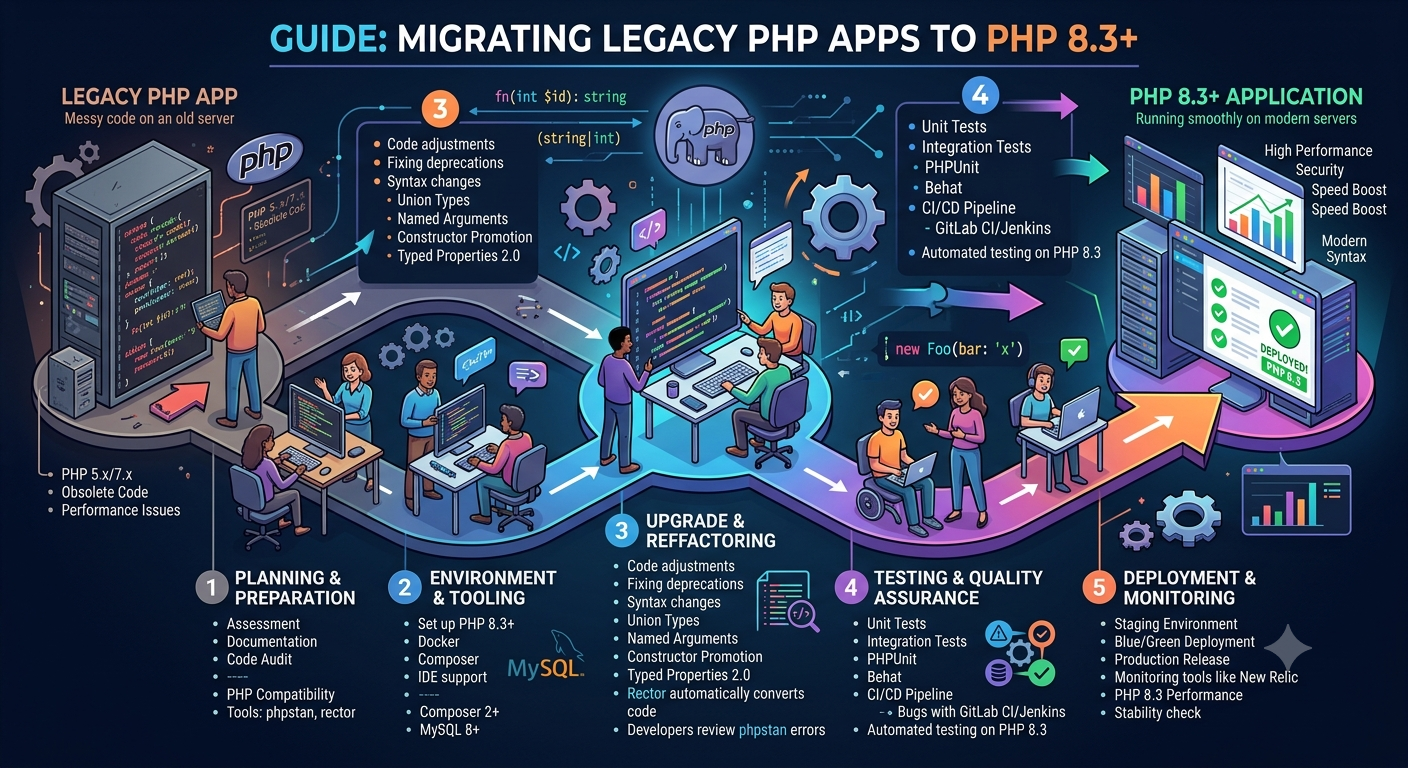
PHP has been the backbone of the web for over two decades, powering millions of applications across the world. But as technology evolves, older PHP versions (like 5.x and 7.x) are slowly becoming obsolete. With the release of PHP 8.3, the language has reached new heights of performance, security, and developer productivity.
If your application still runs on an outdated version, now is the perfect time to migrate. In this guide, you’ll learn how to migrate legacy PHP applications to PHP 8.3+ step by step — safely, efficiently, and without breaking existing functionality.
Why You Should Upgrade to PHP 8.3+
Before diving into the migration process, it’s important to understand why upgrading matters. Running an outdated PHP version can cause serious performance and security issues.
Better Performance
PHP 8+ introduced JIT (Just-In-Time) compilation, significantly improving performance. Many workloads see up to a 40% boost in execution speed compared to PHP 7.
Stronger Security
Older versions like PHP 5.6 and 7.1 no longer receive security updates. Upgrading ensures your app stays protected from vulnerabilities and exploits.
Modern Syntax and Features
PHP 8.x offers new capabilities such as:
-
Attributes (annotations)
-
Union types
-
Match expressions
-
Named arguments
-
Enums and readonly properties
These features help make your code cleaner, shorter, and more reliable.
Improved Type Safety and Error Handling
PHP 8’s strict typing, better error messages, and enhanced debugging make your codebase far more stable.
Long-Term Support
PHP 8.3 provides support until late 2028, ensuring stability and compatibility with modern frameworks.
Step-by-Step Guide to Migrating Legacy PHP Applications
Migrating a large legacy project might feel overwhelming, but breaking it down into manageable steps makes the process much easier.
Step 1: Audit Your Current Application
Start by understanding your existing setup. Identify the PHP version, frameworks, and dependencies your application uses.
Identify Version and Dependencies
Check your PHP version using:
If you’re using Composer, list dependencies:
If not, consider adopting Composer for better dependency management.
Check for Deprecated Functions
Older PHP versions often rely on outdated functions like mysql_connect() or ereg(). Use PHPCompatibility with PHP_CodeSniffer to scan for deprecated code.
Step 2: Set Up a Test Environment
Never upgrade on a live server. Create a staging environment or use Docker to simulate PHP 8.3+.
A simple Docker setup example:
This allows you to safely test without affecting production systems.
Step 3: Update Dependencies and Libraries
Many older frameworks or libraries are incompatible with PHP 8.3. Update them using Composer:
If your project uses older frameworks like CodeIgniter 2, CakePHP 2, or Laravel 4, plan to upgrade to their latest versions for full PHP 8 support.
Step 4: Refactor Deprecated Code
PHP 8.3 removes many legacy functions. Replace them with modern equivalents.
| Deprecated in Old PHP | Replacement |
|---|---|
mysql_* functions | PDO or mysqli |
each() | foreach() |
create_function() | Anonymous functions |
set_magic_quotes_runtime() | Remove it entirely |
Run your application in a PHP 8.3 environment and fix any deprecated or fatal errors that appear.
Step 5: Handle Strict Typing and Errors
PHP 8 enforces strict typing and cleaner syntax. Add type hints to functions for better validation:
You can enable strict typing globally:
Although strict typing might reveal issues in older code, it helps prevent subtle bugs in the long run.
Step 6: Test Thoroughly
Testing ensures your migration is safe and stable.
Unit Tests
Use PHPUnit to verify that each component works as expected:
Integration Tests
Test user interactions such as login, registration, and data submissions.
Static Analysis
Tools like Psalm and PHPStan can automatically catch type and logic errors before runtime.
Step 7: Optimize for PHP 8.3 Performance
After migration, leverage PHP 8.3’s performance features.
-
Enable opcache for faster script execution.
-
Use JIT compilation for computational tasks.
-
Refactor large functions into smaller, reusable parts.
-
Apply null-safe operators and modern array methods for cleaner logic.
Step 8: Update Server Configuration
Ensure your server environment supports PHP 8.3.
-
Update Apache or Nginx configuration files.
-
Verify FastCGI handlers point to the correct PHP version.
-
Check and update
php.inisettings.
Also, confirm your database drivers, extensions (like GD, mbstring, cURL), and caching tools (Redis or Memcached) are compatible.
Step 9: Deploy Gradually
Avoid switching the production environment all at once. Use a phased rollout:
-
Test in staging.
-
Deploy to a small group of users.
-
Monitor logs and performance metrics.
-
Fully roll out once stable.
Monitoring tools like Sentry, New Relic, or Datadog can help track performance and error reports after deployment.
Step 10: Document and Train Your Team
A successful migration requires communication and documentation.
-
Record every change in a migration log.
-
Train developers on new PHP 8 syntax and tools.
-
Update onboarding guides for future contributors.
Clear documentation helps ensure smooth maintenance and consistent coding practices.
Common Migration Challenges
While upgrading, you might face a few obstacles such as:
-
Unsupported libraries: Some old packages no longer update for PHP 8.
-
Framework incompatibility: Major rewrites may be required for old frameworks.
-
Extension issues: Certain extensions might need recompiling.
-
Serialization differences: Data encoded in older formats may behave differently.
Always keep backups and use version control to revert if necessary.
Post-Migration Checklist
Before going live, confirm that everything works smoothly.
✅ All pages and APIs load correctly
✅ No warnings or deprecation notices
✅ Database connections work
✅ Automated tests pass
✅ Performance benchmarks meet expectations
✅ Logs are clean and error-free
✅ SSL and security settings are verified
Final Thoughts
Migrating a legacy PHP application to PHP 8.3+ is a major step toward modernization. It enhances performance, boosts security, and simplifies your development workflow.
Think of migration not just as a version upgrade, but as an opportunity to refactor and future-proof your application. By following a structured plan, testing thoroughly, and adopting modern PHP practices, you’ll ensure your codebase stays robust for years to come.
PHP 8.3 is faster, smarter, and safer — and now is the perfect time to bring your legacy application up to speed.


