Handling WebSockets with Ratchet in PHP
In today’s dynamic web environment, users expect real-time updates, instant notifications, and interactive experiences. From chat applications to stock tickers and multiplayer games, real-time communication is essential. While PHP is traditionally known for request-response web interactions, it’s now capable of handling persistent connections using WebSockets.
The Ratchet PHP library brings WebSocket functionality to PHP, allowing developers to build event-driven, interactive, and scalable real-time applications. In this guide, we’ll explore how WebSockets work, how Ratchet implements them, and how to build and optimize PHP-based real-time apps in 2025.
What Are WebSockets?
WebSockets are a protocol that enables full-duplex communication between a client (usually a browser) and a server over a single TCP connection. Unlike HTTP, which is request-based (the client requests, the server responds), WebSockets allow both the client and server to send and receive data at any time.
Key Advantages of WebSockets
-
Real-time updates: No need for constant polling or refreshing.
-
Reduced bandwidth: Only one persistent connection is maintained.
-
Low latency: Ideal for instant message delivery.
-
Bidirectional communication: Both server and client can push data simultaneously.
Use Cases
-
Chat and messaging platforms
-
Live notifications or alerts
-
Stock market dashboards
-
Online gaming
-
Collaborative tools (e.g., Google Docs-style editors)
Why Use Ratchet for WebSockets in PHP?
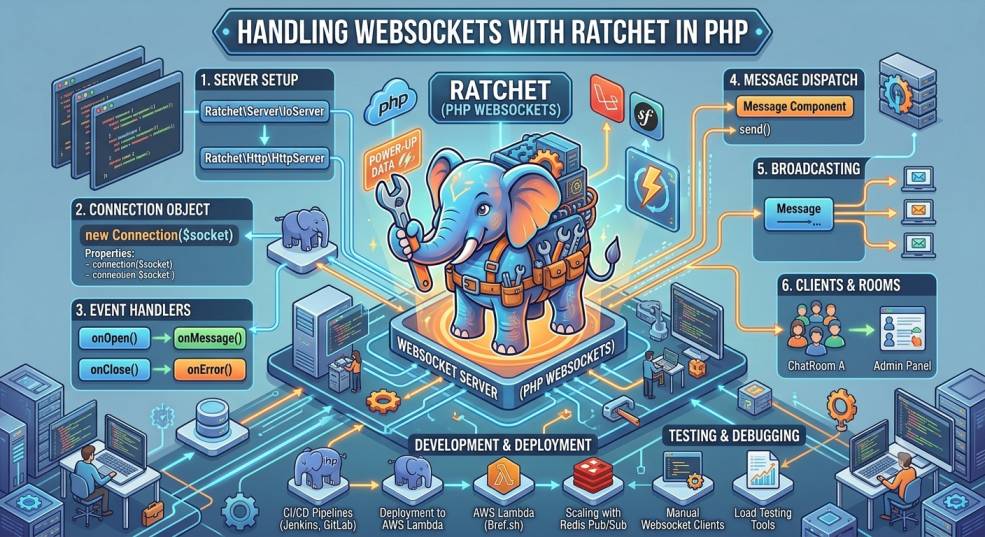
Ratchet is a lightweight PHP library designed for real-time, bidirectional communication between clients and servers. Built on top of ReactPHP, Ratchet enables event-driven, asynchronous applications in PHP.
Key Benefits of Ratchet
-
Asynchronous I/O: Handles multiple clients simultaneously without blocking.
-
Event-driven architecture: Reacts to incoming messages and connections efficiently.
-
Integration-ready: Works well with existing PHP frameworks like Laravel and Symfony.
-
Scalable: Can handle thousands of connections when properly configured with a load balancer.
By combining Ratchet with ReactPHP’s non-blocking event loop, PHP can manage WebSocket connections effectively—something that was nearly impossible a decade ago.
How Ratchet Works
Ratchet uses an event loop (powered by ReactPHP) to manage open WebSocket connections. When a client connects, sends a message, or disconnects, Ratchet triggers an event (like onOpen, onMessage, onClose) that you can handle in your PHP code.
In simpler terms, instead of waiting for HTTP requests, Ratchet applications “listen” for WebSocket events and act accordingly.
Setting Up Ratchet in PHP
Let’s walk through the process of setting up a basic Ratchet WebSocket server.
Step 1: Install Ratchet via Composer
In your project directory, run:
This installs Ratchet along with ReactPHP, its core dependency.
Step 2: Create a WebSocket Server
Here’s a simple example to set up a chat-like server:
Step 3: Run the WebSocket Server
Now, start the WebSocket server using ReactPHP’s HTTP server:
Run this script:
Your WebSocket server will now listen for connections on port 8080.
Step 4: Connect Clients Using JavaScript
Create a simple frontend to test the connection:
Now open this HTML file in two browser tabs—when you send a message from one, it should instantly appear in the other.
Advanced Ratchet Features
Once you’ve mastered the basics, Ratchet offers several advanced features for scaling and security.
1. Broadcasting Messages
You can easily modify your Ratchet server to broadcast messages to all connected clients (e.g., for live notifications).
2. Authentication
For secure applications, authenticate users before establishing WebSocket connections. You can integrate JWT or API tokens for validation.
3. Integration with Laravel or Symfony
Use Ratchet as a standalone WebSocket server and communicate with your Laravel or Symfony app using Redis Pub/Sub or message queues.
4. Handling Large Traffic
To handle high-traffic real-time systems, deploy Ratchet servers behind Nginx, and use HAProxy or Load Balancers for distributing connections.
5. Using WAMP Protocol
Ratchet supports WAMP (Web Application Messaging Protocol) via the Thruway project, which enables RPC calls and publish/subscribe mechanisms.
Performance Optimization Tips
Even though PHP is not inherently asynchronous, combining Ratchet with ReactPHP and proper optimizations can yield high performance.
-
Enable OPcache for faster execution.
-
Use event loops efficiently with ReactPHP to handle thousands of concurrent clients.
-
Leverage caching (e.g., Redis or Memcached) for frequently accessed data.
-
Minimize blocking I/O operations in the
onMessagemethod. -
Implement rate limiting to prevent abuse of WebSocket connections.
Security Considerations
Since WebSocket connections are persistent, maintaining security is crucial.
-
Always use WSS (WebSocket Secure) with SSL/TLS encryption.
-
Validate user input to avoid injection attacks.
-
Limit connection lifetimes and close idle connections.
-
Use JWT-based authentication for secure access.
-
Regularly update dependencies to avoid vulnerabilities.
Monitoring and Scaling
For large-scale applications, monitoring and scaling are key.
-
Use supervisord or systemd to keep the Ratchet server running continuously.
-
Log all WebSocket events using Monolog.
-
Implement centralized monitoring with tools like Prometheus or Grafana.
-
Scale horizontally by running multiple Ratchet instances behind a load balancer.
Real-World Applications of Ratchet
Many companies and projects leverage Ratchet for real-time PHP applications:
-
Chat applications: Live user-to-user communication.
-
Live notifications: For e-commerce orders, updates, or system alerts.
-
Sports updates and stock tickers: Real-time data delivery.
-
Collaborative tools: Real-time document or project collaboration.
-
IoT dashboards: Displaying live sensor data.
These use cases demonstrate PHP’s growing power in the real-time web development space.
Conclusion
With modern tools like Ratchet and ReactPHP, PHP has transformed into a capable platform for real-time communication and WebSocket-based applications. It bridges the gap between traditional web apps and dynamic, interactive platforms that users expect in 2025.
By adopting Ratchet, developers can create chat systems, notifications, dashboards, and live feeds without leaving their PHP ecosystem. Combined with Docker, Nginx, and load balancers, these applications can scale effortlessly.
The key to success lies in writing event-driven code, maintaining secure connections, and optimizing for performance. Whether you’re building a small real-time app or a large-scale communication platform, Ratchet makes WebSockets in PHP not just possible—but powerful.


