Deploying PHP Apps to AWS Lambda
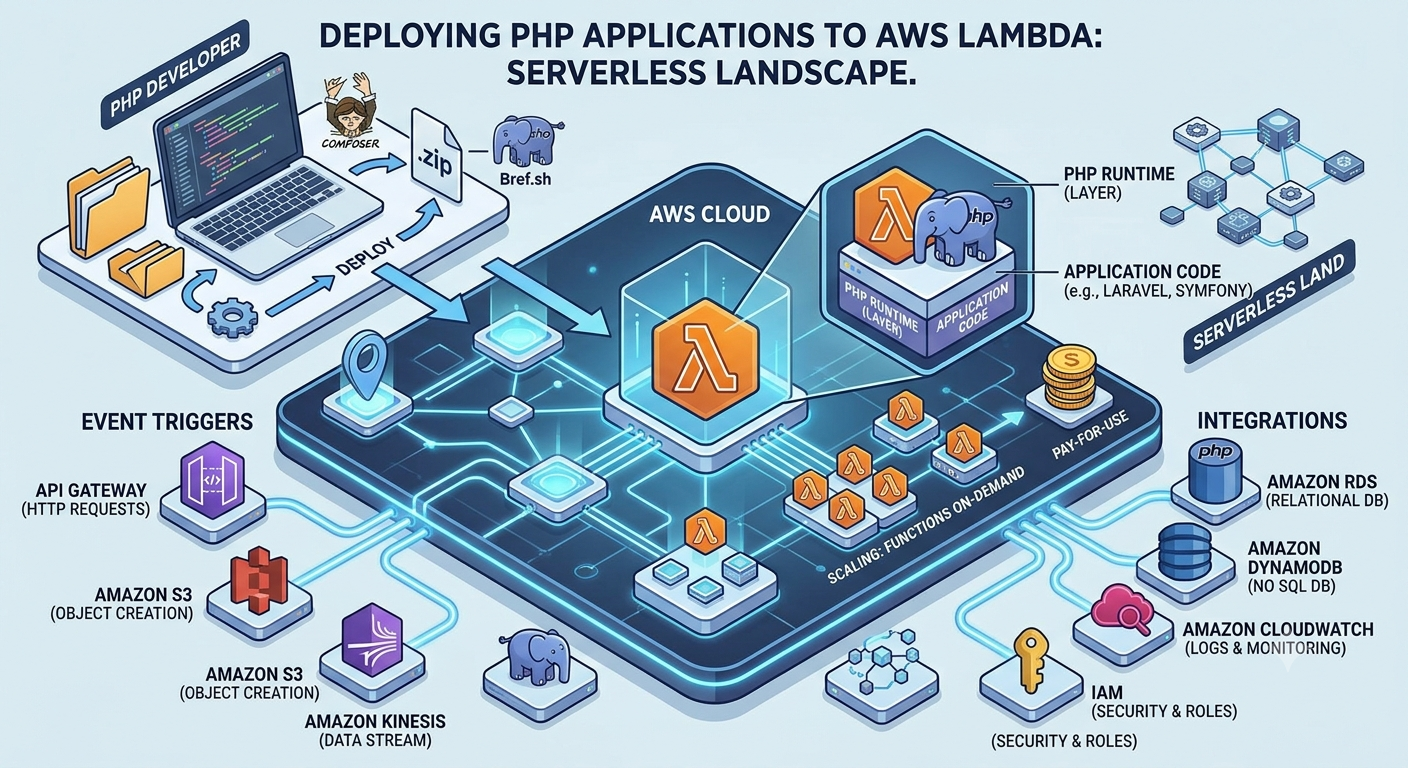
Serverless architecture has rapidly gained popularity among development teams, particularly for applications that benefit from auto-scaling, high availability, reduced maintenance, and cost efficiency. While AWS Lambda natively supports languages like Python, Node.js, and Go, PHP is not officially supported out of the box. However — thanks to custom runtimes and frameworks like Bref, running PHP on Lambda has become not only possible but also practical in production environments.
This article provides a clear, vendor-neutral explanation of how to deploy PHP applications to AWS Lambda, including architecture options, use cases, limitations, and best practices — no code, just strategic implementation guidance.
Why Deploy PHP on AWS Lambda?
Key Benefits
| Benefit | Explanation |
|---|---|
| Auto-scaling | Lambda automatically adjusts capacity based on demand. |
| Reduced hosting cost | You only pay when requests are processed. Ideal for low to medium traffic. |
| Zero server maintenance | No need to manage EC2, web servers, or containers. |
| Resilience & availability | Built-in redundancy across availability zones. |
Ideal Use Cases
-
APIs built with frameworks like Laravel, Symfony, Slim, or custom microservices.
-
Cron jobs, scheduled tasks, or background workers.
-
Event-triggered functions (file processing, database updates, webhooks).
-
Lightweight backend services for SaaS, mobile apps, and dashboards.
How PHP Runs on AWS Lambda
Since Lambda does not ship with PHP, developers use custom runtimes.
The most widely used runtime layer is Bref, which provides:
-
Precompiled PHP binaries optimized for Lambda
-
Runtime layers for event-driven and HTTP-based workloads
-
Integration with frameworks like Laravel and Symfony
-
CLI tools for serverless deployment
Bref essentially acts as a PHP runtime for Lambda, allowing PHP scripts to execute in the serverless environment.
Common Architecture Options
1. Lambda as an HTTP Web Handler (API Gateway + PHP Runtime)
This is used when you want to run a serverless API.
Flow
Client → API Gateway → AWS Lambda (PHP Runtime) → Response
Good for:
-
REST APIs
-
JSON web services
-
Stateless request handling
2. Lambda as an Event-Driven Processor (S3 / DynamoDB / SQS / SNS)
Here PHP Lambda functions run without HTTP, triggered by AWS services.
Examples
-
Process an image when it's uploaded to S3.
-
Send an email when a message arrives in SQS.
-
Sync data when a DynamoDB record changes.
Good for:
-
Background automation tasks
-
Pipelines and batch job systems
3. Serverless Laravel / Symfony Apps
Using Bref's “FPM on Lambda” runtime, full web frameworks can be deployed to Lambda.
Ideal for
-
Medium-traffic SaaS dashboards
-
Multi-tenant admin applications
-
APIs with moderate bursty workloads
Cold Starts & Performance Considerations
AWS Lambda spins up execution environments on demand. This can cause latency during initial requests (cold starts), especially with large frameworks like Laravel.
Ways to reduce cold start:
-
Use AWS Lambda provisioned concurrency
-
Keep dependencies minimal
-
Use a lightweight framework for APIs (Slim, Lumen if possible)
-
Cache configurations, views, and routes
Avg. Cold Start Impact
| Framework | Cold Start Time (ms) |
|---|---|
| Laravel (Serverless) | 150–500ms |
| Slim Microservice | 30–100ms |
If millisecond-level real-time performance is essential (e.g., stock trading or chat), Lambda may not be ideal.
State & Storage Constraints
Lambda functions are stateless. Each invocation runs independently.
Therefore:
-
Sessions cannot be stored in memory; use Redis or DynamoDB.
-
File writes must use
/tmpdirectory (limits around 512MB). -
Persistent uploads should store to S3, not local disk.
-
Database connections should be optimized with pooling via RDS Proxy.
Deployment Patterns
Recommended Tools & Services
| Purpose | Tool/Service |
|---|---|
| Runtime layer | Bref |
| Deployment automation | Serverless Framework, SAM, or Terraform |
| HTTP Interface | AWS API Gateway |
| Database | AWS RDS (with RDS Proxy) |
| Storage | AWS S3 |
| Queue / async tasks | AWS SQS or EventBridge |
Deployment Workflow
-
Write PHP application normally.
-
Add Bref runtime layer.
-
Configure API Gateway / event triggers.
-
Deploy through Serverless Framework.
-
Monitor using CloudWatch.
Cost Comparison: Serverless vs Traditional Hosting
| Hosting Model | Suitable Scenario | Cost Behavior |
|---|---|---|
| EC2 / VPS | High traffic, predictable workloads | Constant price |
| Lambda (Serverless) | Spiky workloads, low/medium traffic | Pay-per-request |
Example:
If your API gets 100k requests/month, serverless is significantly cheaper than maintaining an EC2 instance.
Common Challenges & Solutions
| Challenge | Solution |
|---|---|
| Slow cold starts | Enable provisioned concurrency |
| Database connection exhaustion | Use RDS Proxy |
| Framework boot time too high | Cache configs, optimize autoloading |
| Vendor binaries too large | Use Lambda layers and asset bundling |
Best Practices
-
Keep each function small and single-purpose.
-
Avoid global state — assume the environment is ephemeral.
-
Use managed services (SQS, SNS, DynamoDB, S3) instead of reinventing state.
-
Monitor logs and metrics with CloudWatch and X-Ray tracing.
-
If traffic becomes stable and high, consider migrating to ECS/Fargate.
Conclusion
Running PHP applications on AWS Lambda is not only feasible but often strategically advantageous. With the help of custom runtimes like Bref, PHP can integrate seamlessly into the serverless ecosystem. The key is understanding where Lambda excels — bursty workloads, APIs, event-driven processing, and low-maintenance deployments — and ensuring your application architecture aligns with stateless, distributed design principles.


