Building Headless CMS with PHP
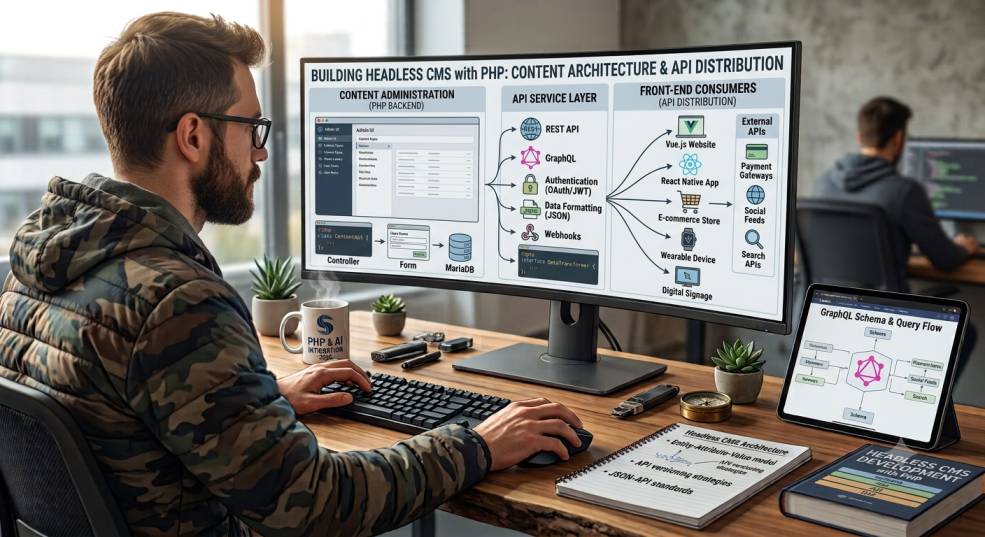
The demand for dynamic, multi-channel content delivery has reshaped how developers think about content management systems (CMS). Traditional CMS platforms like WordPress, Joomla, or Drupal tightly couple the backend and frontend, meaning the same system manages content storage and presentation. While effective for classic websites, this approach becomes restrictive when organizations want to deliver content across various platforms — mobile apps, smart TVs, IoT devices, web apps, kiosks, and more.
This is where the concept of a Headless CMS comes in. Rather than serving content through a built-in templating layer, a headless CMS focuses solely on content storage and programmatic delivery, usually through REST or GraphQL APIs. The frontend — the "head" — is decoupled and can be developed using any technology.
In this article, we’ll explore how to build a headless CMS using PHP, discuss architecture, essential components, and best practices to ensure scalability and performance.
What is a Headless CMS?
A headless CMS is a content management backend that stores and organizes content but does not control how that content is displayed. It exposes the content via APIs so that developers can use it in any interface.
Key Characteristics of a Headless CMS
| Feature | Traditional CMS | Headless CMS |
|---|---|---|
| Backend + Frontend Coupled | Yes | No |
| API-Based Delivery | Limited or Plugin-Dependent | Native |
| Flexible Frontend Technologies | Limited to supported engines | Any (React, Vue, Flutter, etc.) |
| Suitable for Multi-Channel Content | Not ideal | Perfect |
Why Use PHP to Build a Headless CMS?
PHP is widely used for web application development and offers several advantages for building a headless CMS:
-
Mature Ecosystem: Frameworks like Laravel, Symfony, and Slim make API creation efficient.
-
Database Flexibility: Works seamlessly with MySQL, PostgreSQL, MongoDB, and others.
-
Strong Community Support
-
Ease of Deployment on shared hosting, VPS, or cloud environments.
While you can use frameworks, even native PHP can handle headless CMS requirements with the right architectural decisions.
Core Components of a Headless CMS
To build a headless CMS, we must first understand the essential building blocks:
1. Content Repository
This is where content is stored. A typical content model may include:
-
Content Types (e.g., blog posts, products, pages)
-
Fields (title, body, images, tags)
-
Revision history (optional but recommended)
2. User Roles and Permissions
Editors, admins, authors, and API clients may need different access levels.
3. Content Editing Interface
A dashboard for non-technical users to create and manage content.
4. API Layer
The heart of a headless CMS — exposes content via:
-
REST JSON API
-
Or GraphQL API
5. Caching and Optimization
To ensure high performance when delivering content to external apps.
Designing the Architecture
A clean architecture for a headless CMS in PHP might look like this:
The frontend that consumes content could be:
-
A website built using Next.js
-
A mobile app developed in Flutter
-
A static site powered by Nuxt
-
A digital kiosk, smartwatch, or IoT interface
Modeling Content with Flexibility
One of the challenges in building CMS platforms is designing a flexible content schema that supports different structures.
Two common approaches:
1. Structured Tables per Content Type
For example:
-
poststable -
pagestable -
productstable
Pros: Well-organized
Cons: Hard to scale when adding new content types
2. Dynamic JSON Storage
Store fields in JSON format, e.g.:
| id | type | data (json) |
|---|---|---|
| 1 | blog | {"title": "...", "body": "..."} |
Pros: Highly flexible
Cons: Requires strong validation logic
User & Role Management
You should define roles such as:
-
Admin – Manage everything
-
Editor – Approve & publish content
-
Author – Create content but require approval
-
API Token / Client – Read-only public or private access
Using JWT (JSON Web Tokens) helps secure API access.
Delivering Content via REST API
The API should expose endpoints like:
Responses are usually in JSON format so clients can easily consume them.
Handling Media and Assets
A headless CMS must support file uploads:
-
Store on server or use Cloud Storage (AWS S3, DigitalOcean Spaces)
-
Serve via CDN for performance
-
Store metadata (alt text, captions, tags)
Caching Strategies
To ensure fast delivery:
-
Cache API responses using Redis or Memcached
-
Implement content invalidation on save/update events
This ensures clients always receive fresh but optimized data.
Versioning and Revision History
Editors often need to revert content to previous versions.
Storing revisions or snapshots increases control and safety.
Frontend Consumption Examples
Here’s how different platforms may use your headless PHP CMS:
-
React Website → Fetches
/api/content/blog -
Flutter App → Loads
/api/content/products -
Voice Assistant → Reads JSON response and converts to spoken text
-
Static Site Generator → Uses API during build time
This adaptability is the core reason headless CMS is gaining adoption.
Benefits of a Headless CMS
| Benefit | Description |
|---|---|
| Multi-Channel Delivery | Deliver content anywhere |
| Future-Proof | Frontend stack can change without touching backend |
| Scalability | API layer can handle large usage |
| Developer Freedom | Teams can use modern JS, mobile frameworks |
| Better Performance | Optimized delivery via CDN + caching |
Conclusion
Building a Headless CMS with PHP provides an adaptable, scalable, and future-proof content system. By decoupling content management from presentation, organizations gain the flexibility to distribute content across websites, apps, and emerging platforms without rebuilding backend logic. With PHP’s powerful frameworks, database support, and API tooling, developers can create robust headless CMS solutions suitable for modern digital experiences.
If you're ready to expand your development approach and build more flexible content-driven platforms, adopting the headless model is a smart step forward.


